
Nagatha
The formidable aunt
Warm heart. Raised eyebrow. Absolutely expects better of you.
“Darling, leave the remembering to me.”
Coming soon for iPhone & iPad
Irk’d™ is a reminder app with random nagging as its default. Pick a nag, pick how much nag you can take, hand over the thing you keep putting off, and let them pester you until it’s done. Free to download, with Irk’d More when you want the whole cast.
Designed for iOS & iPadOS 17 or later

Choose your nag
Four big personalities. Zero chill. Whoever is on duty writes every nudge, so choose the voice you can stand hearing twenty-four times a day. Nagatha comes free; Nagbert, Nagnus, and Pingston join her with Irk’d More.
The formidable aunt
Warm heart. Raised eyebrow. Absolutely expects better of you.
“Darling, leave the remembering to me.”

The distracted genius
An original eccentric professor applying far too much science to your errands.
“A problem for future you! I shall supervise the experiment.”
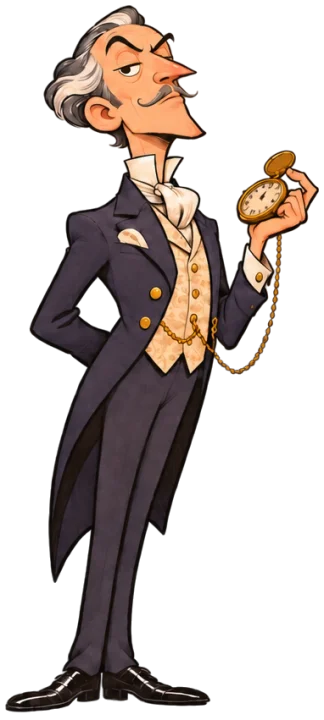
The superior gentleman
Impeccable manners. Very little faith in you. Enjoys a politely devastating remark.
“A sensible decision, involving someone reliable.”

The anxious butler
Has considered every consequence. Prepared three contingency plans. Still worried.
“Recorded and double-checked. One more check couldn’t hurt.”
Turn up the nag
Set a pain tier for each nag in a profile, from a couple of pokes a day on Mild to a couple of dozen on Unhinged, which you can pick with Irk’d More. Every reminder inherits it, and any single reminder can override it. Random nudges land at varied times inside your nagging hours, 9 AM to 9 PM to start.
Add a deadline and the nagging escalates as it gets closer, on every plan. Deadlines are a day by default, with an optional time. Each reminder has a switch to opt out of the ramp.
A couple of well-placed pokes.
Enough to be difficult to ignore.
Your nag has cleared their diary.
You did ask for this.
A look inside with Irk’d More
Whoever is on duty sits at the top with a fresh remark. Below that, your To Do and Done lists, and one big button for the next thing you’ve been avoiding. The white flag beside Settings is for when you’ve had enough.
The adjacent image shows: Irk’d Home screen with a white flag and a Settings button in the header, the Home profile bar, Nagnus on duty saying “Still not done? How surprising.”, a To Do list of random reminders, and a button labeled Something to nag about.After a three-card tour, choose your nag and intensity, review permissions, and decide whether to sync. Location access is optional for nearby reminders. Each nag comes with a role, a signature line, and a colour. Nagatha is free; the other three come with Irk’d More.
The adjacent image shows: The Choose your nag screen, step 2 of 6, with four portrait cards: Nagatha, Nagbert, Nagnus, and Pingston.Pick how much you can take, from a couple of well-placed pokes to “you did ask for this.” New profiles start on Persistent, and the app says so plainly when your nag has cleared their diary.
The adjacent image shows: The How much nag? screen, step 3 of 6, with Mild, Persistent, Relentless, and Unhinged cards, each with a symbol and a one-line description, and Persistent selected.What · When · How
What needs doing, with an optional list of steps. When it needs doing, with a deadline or a repeating schedule. Pick a delivery option and choose which profile gets the reminder. Home and Work are both free. Place reminders and repeating schedules come with Irk’d More.
The adjacent image shows: Step 3 of 3 of a new reminder, How shall we nag?, with Random nudges selected, Near a place and At a time options, a card saying Nagnus has this at Persistent, about 5 nudges a day, and Home and Work profile buttons.Comic Burst is the default. With Irk’d More, match the icon to whoever is on duty, or keep one character out front no matter who is nagging. It is a setting on your phone, nothing more.
The adjacent image shows: The App icon settings sheet listing Comic Burst, selected, Match active nag, and Nagatha, Nagbert, Nagnus, and Pingston under Keep a specific character.Tap the flag and every nag goes quiet for four hours, in every profile. The flag turns green and shows when the quiet ends, your nag goes off duty, and anything set for a time waits for the end. Tap it again to call off the truce.
The adjacent image shows: Irk’d Home screen during Cry Uncle!: the green flag button reads Quiet until 2:49 PM and Nagnus’s badge reads Off duty.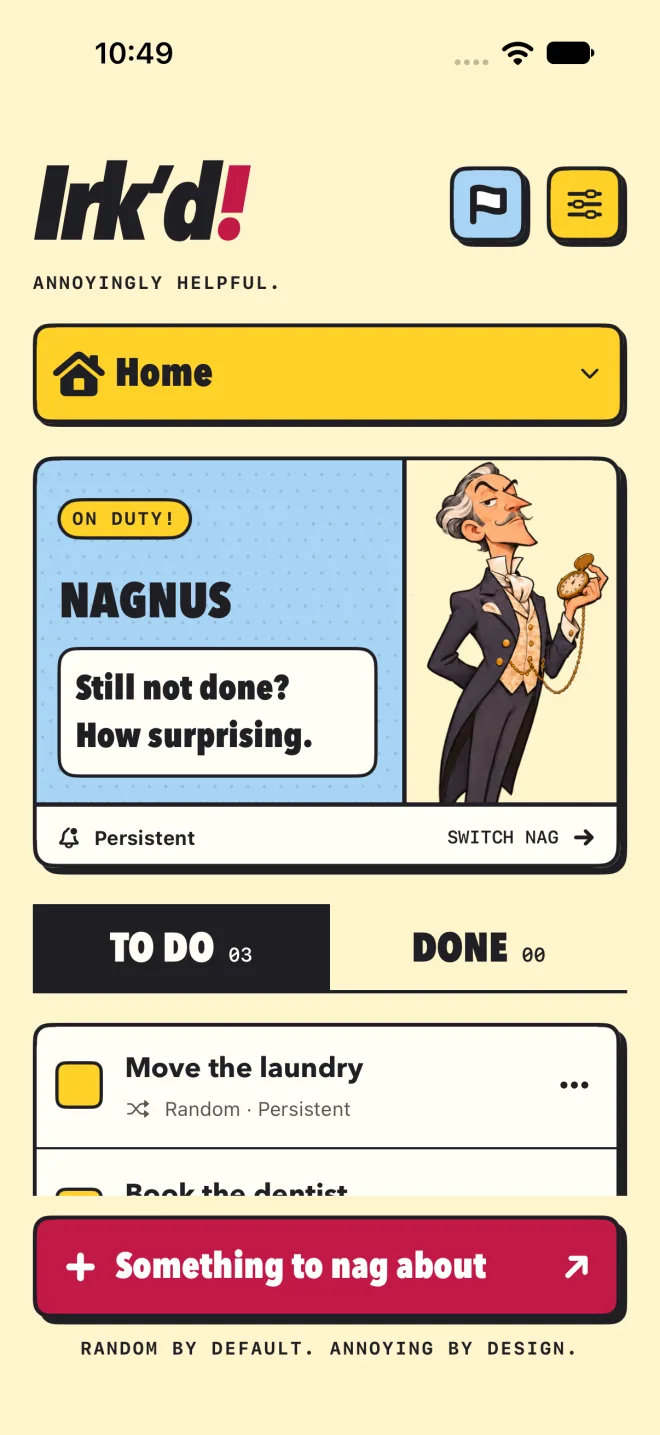
More ways to be reminded
Random is the default, not the limit.
Set an exact time, or, with Irk’d More, pick a place and a 1- to 5-mile radius. Arrive and the nagging starts, with follow-ups for up to three hours. Allow Always and keep Precise Location on so the run can start and stop while the app is closed.
Tap the white flag and every nag goes quiet for four hours, in every profile. Anything set for a time in those hours waits until the end. Tap the flag again to call off the truce early. Your nag will have something to say about it.
Give a reminder up to 50 steps, like a shopping list under “Go to the store.” Tick them off from Home and the last one finishes the job. Steps never nag on their own; the nudge just tells you how many are left.
Repeating nags for the daily stuff: every day or on selected days of the week, every two weeks, monthly, every three months, or yearly. Check off up to eight rounds per cycle and pick up again on the next scheduled day.
On iOS or iPadOS 26 or later, a reminder with an exact time or timed deadline can also ring a system alarm at that time or up to an hour before. Alarms cut through Silent mode, Focus, and Cry Uncle!, and stay on the device where you set them. Free, and off until you turn it on.
Mark it done or snooze for an hour from the notification, or swipe a reminder right for Done and left for Delete. Finished reminders move to the Done list, and their checkbox brings them back.
Profiles keep separate lists, nags, pain tiers, and nagging hours, and every one keeps nagging. All profiles shows unlocked lists together. Home and Work are free. Irk’d More adds custom profiles and the option to lock any profile.
Optional iCloud sync through your own account, with a review before the first merge. Share a single reminder with someone, read-only or editable. No separate Irk’d account.
Reminders are saved on your device. You choose whether to sync or share through iCloud. Place searches use Apple Maps.
Comic Burst is the default app icon. With Irk’d More, match it to whoever is on duty, or keep a favourite nag out front for good. The choice stays on your device.
 Comic Burst
 Nagatha
 Nagbert
 Nagnus
 Pingston
Free, or More
Irk’d is free to download and properly annoying without paying a thing. Irk’d More is an optional monthly or yearly subscription. The App Store shows the price before you subscribe.
Free
Optional subscription
More features. More personality. More persistence.
If Irk’d More lapses, the reminders and settings you already set up keep working. Free limits apply when you add reminders or set up new features.

Your next nag is on the way
Irk’d is in development for iOS 17 and iPadOS 17 or later. It will be free to download, with Irk’d More available inside the app. Check back here for the App Store link at launch, or read the support page in the meantime.